Trading gold on leverage is high risk and you can lose some or all of your deposit.
Smith Block Markets is a Vantage introducing broker: Vantage pays us a rebate from its
normal trading costs, at no extra cost to you. Screens are Vantage’s own and may change.
Before you start
Have these ready
Your passport or driving licence.
A letter proving your address, in your name: a recent utility bill or bank statement.
Your phone, for the one-time codes and a quick face scan.
A card in your name (or a crypto wallet) to deposit.
About 20 minutes.
Use our link
Sign up through
https://vigco.co/la-com-inv/T6AZv5gk
(the button on goldsmithtrading.com/join uses it). Our referral code T6AZv5gk is
added for you. Without it we can’t switch Goldsmith on.
Already have a Vantage account?
No need to sign up again. Log in to your Vantage client portal, open Profile and
complete the Transfer IB/CPA/Sales form: choose IB and enter 24007801. If you can’t
find it, email Vantage support from your registered email and ask them to link your account
to IB 24007801. Then message us.
The account is yours
You open it in your own name and fund it yourself. Money can only ever go back to your
own bank. We never hold your funds and can’t withdraw them.
Trading gold on leverage is high risk and you can lose some or all of your deposit.
Step 1
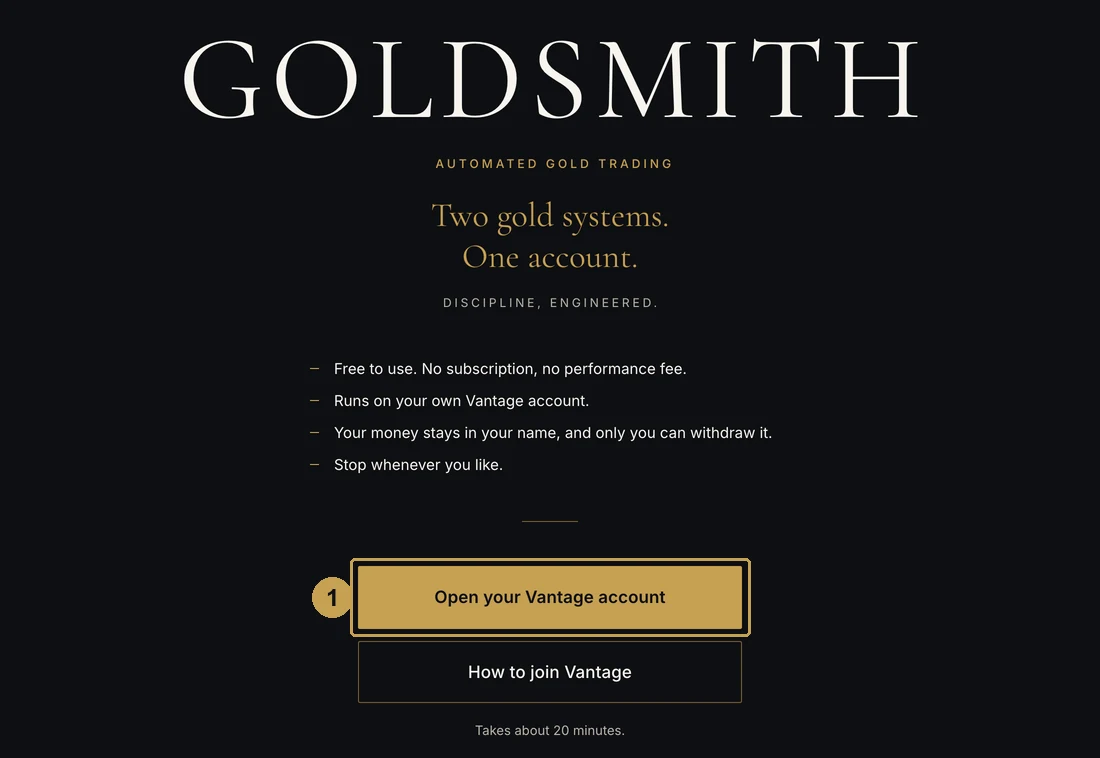
Open the sign-up page
Go to goldsmithtrading.com, or tap the link we sent you.
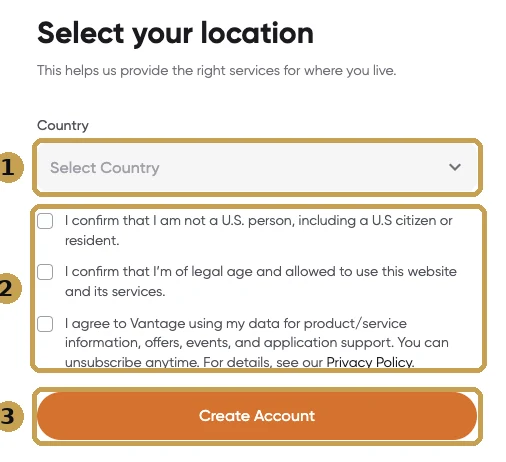
Pick the country you live in. It must match your ID and proof of address.
Tick the boxes: you’re not a U.S. person, you’re of legal age, and you agree to Vantage using your details.
Tap Create Account.
Goldsmith isn’t available to U.S. citizens or residents.
Step 3
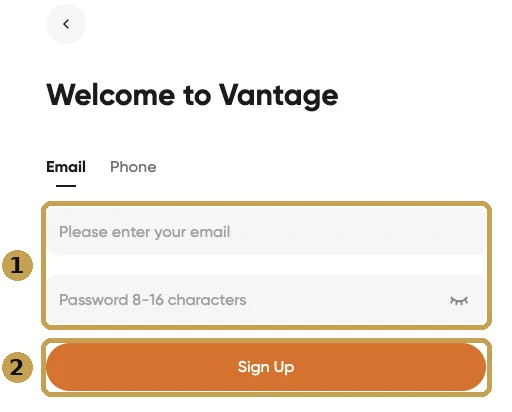
Create your login
Enter an email address you check, and a password of 8–16 characters.
Tap Sign Up.
Write this password down. It’s your Vantage login for the app and website.
Step 4
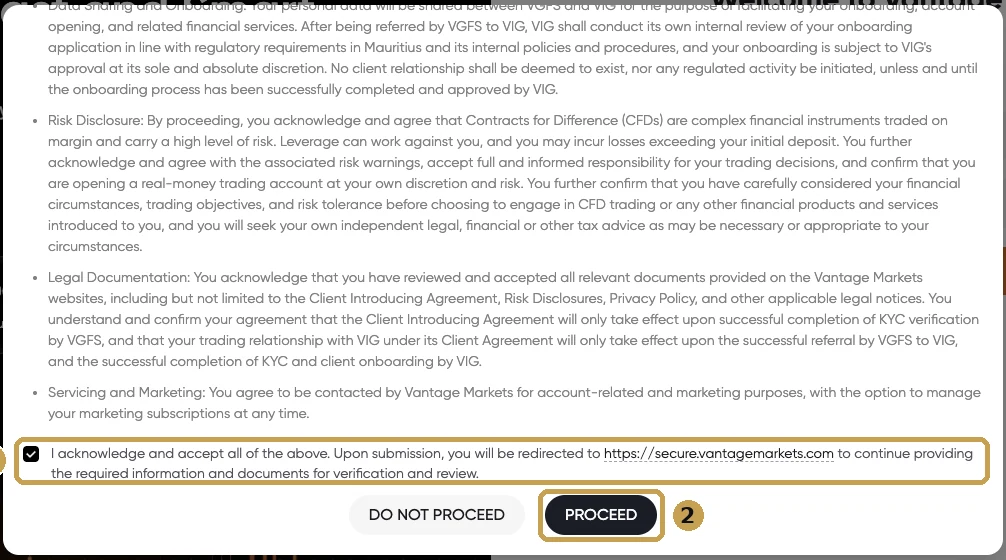
Accept Vantage’s terms
Read the agreement, then tick I acknowledge and accept all of the above.
Tap Proceed. You’re taken to Vantage’s secure site, secure.vantagemarkets.com.
This includes Vantage’s risk warning: trading on margin is high risk and you can lose more than you put in.
Step 5
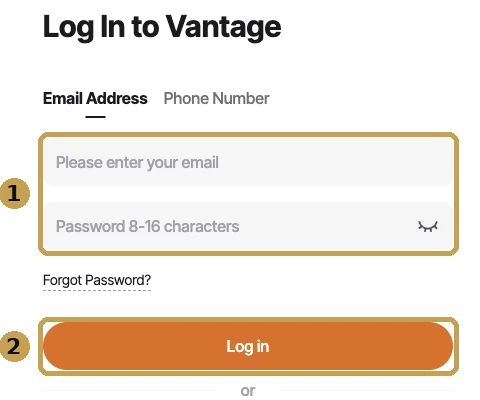
Log in
Enter the email and password you’ve just made.
Tap Log in. The home page shows three stages: Verify Identity, Open Account, Deposit. Tap Verify Now.
If you close the page at any point, come back and log in. Your progress is saved.
Step 6
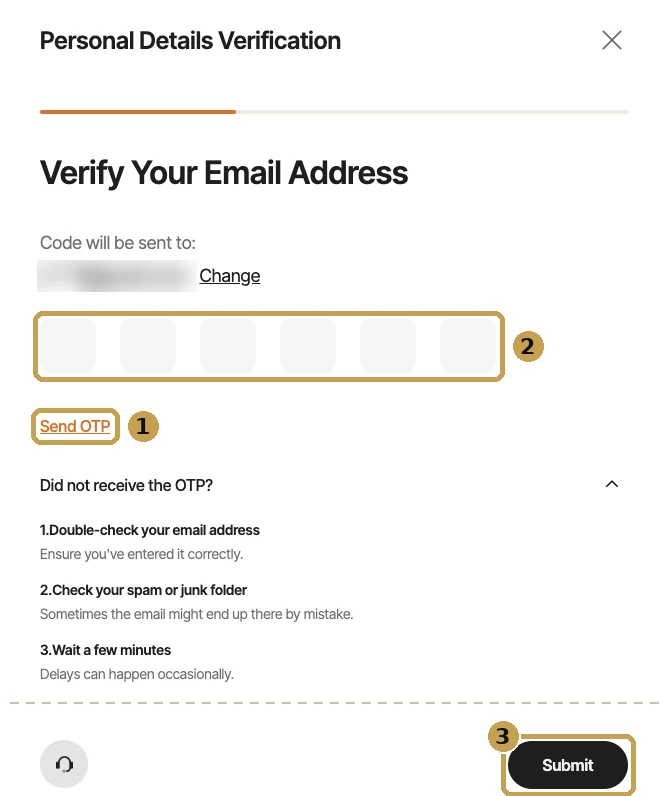
Verify your email
Tap Send OTP. Vantage emails you a 6-digit one-time code.
Type the code into the boxes.
Tap Submit.
No code? Check your spam or junk folder and give it a few minutes before asking for another.
Step 7
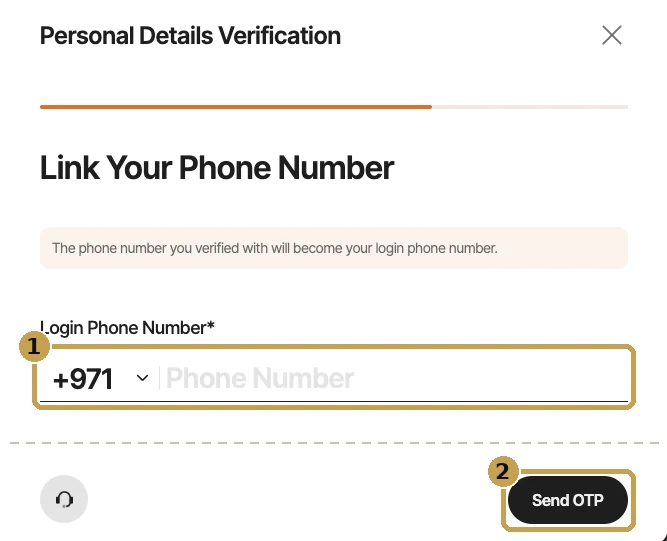
Link your phone number
Choose your country code (for example +44 for the UK, +971 for the UAE) and type your number, usually without the first 0.
Tap Send OTP, then enter the code Vantage texts you.
This number becomes your login phone number, so use one you’ll keep.
Step 8
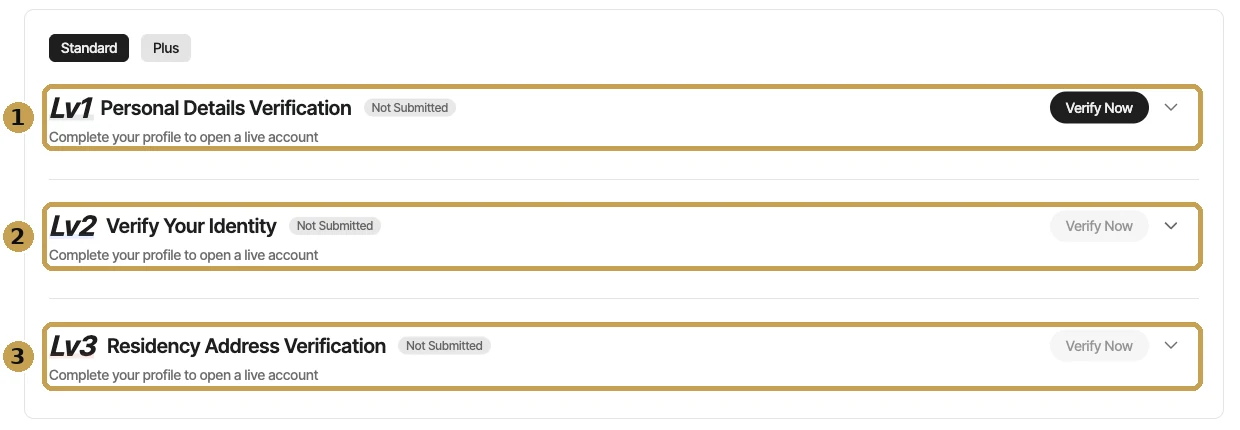
Complete the three verification levels
Lv1 Personal Details: tap Verify Now and fill in your details exactly as they appear on your ID.
Lv2 Verify Your Identity: upload a clear photo of your passport or driving licence.
Lv3 Residency Address: upload a letter showing your name and address, such as a recent utility bill or bank statement.
Each level unlocks after the one before. Vantage usually approves the same day. You’ll find this page any time under Profile → Verification.
Step 9
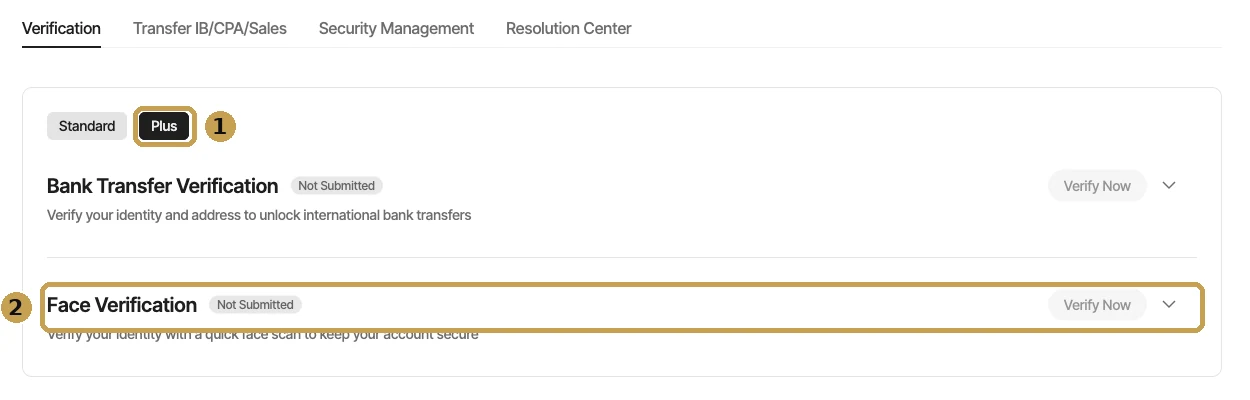
Complete Plus verification
On the same page, tap the Plus tab.
Next to Face Verification, tap Verify Now and follow the quick face scan on your phone.
Don’t skip this: Plus verification unlocks Vantage’s promotions, including the deposit bonus.
Step 10
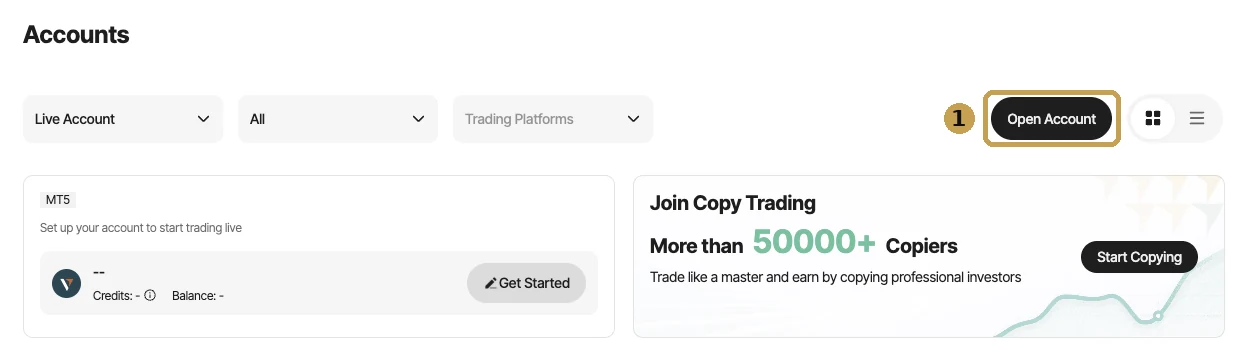
Open your live trading account
Go to Accounts and tap Open Account. Signing up alone doesn’t create a trading account.
Make sure you’re on Live Account, not Demo.
Step 11
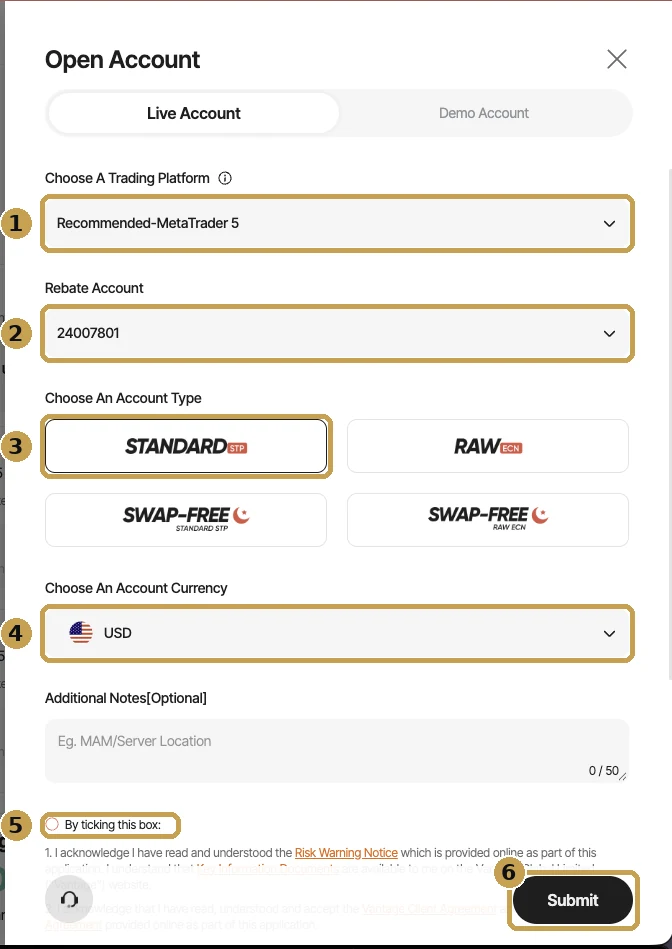
Choose your account settings
Platform: MetaTrader 4 or MetaTrader 5, whichever you prefer.
Rebate Account must show 24007801. If it doesn’t, stop and message us.
Account type: Standard STP. This is a must; Goldsmith runs on Standard STP only.
Currency: USD is preferred. Another currency is fine, as long as you deposit the equivalent of at least $1,000.
Read the notices and tick the box.
Tap Submit.
If you’re asked for leverage, choose 500:1. Vantage then emails your account number and server name. Keep that email.
Step 12
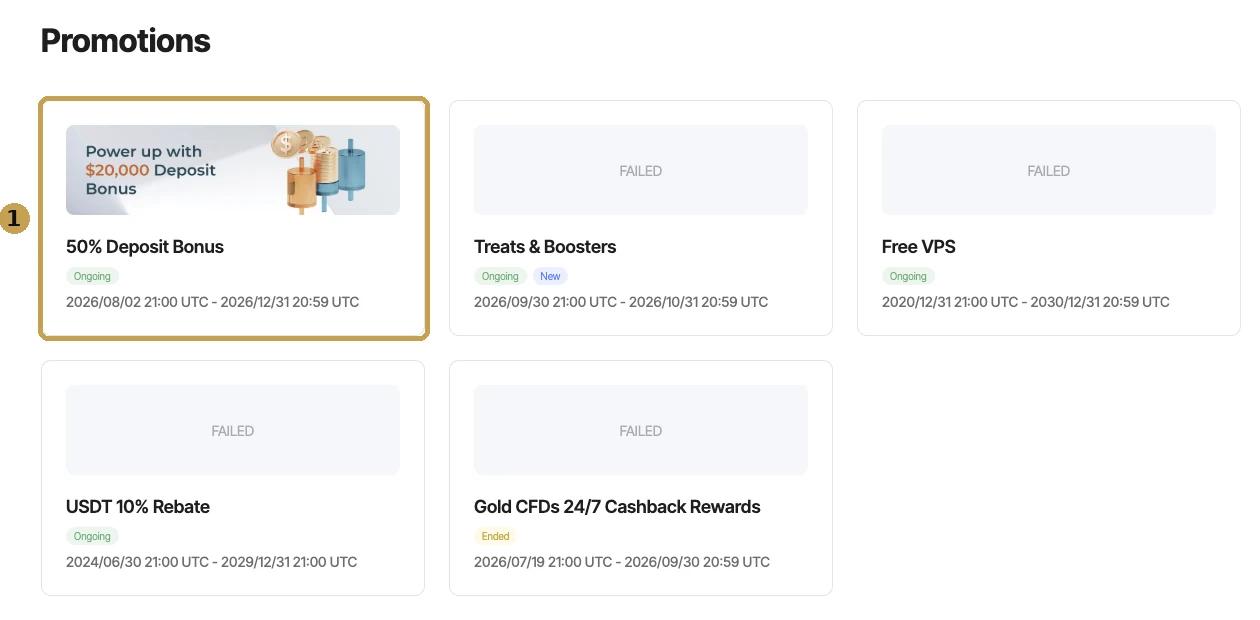
Go to Promotions
Open Promotions and tap the Deposit Bonus offer.
Do this before you deposit. If you deposit first, you lose the bonus.
Step 13
Opt in to the deposit bonus
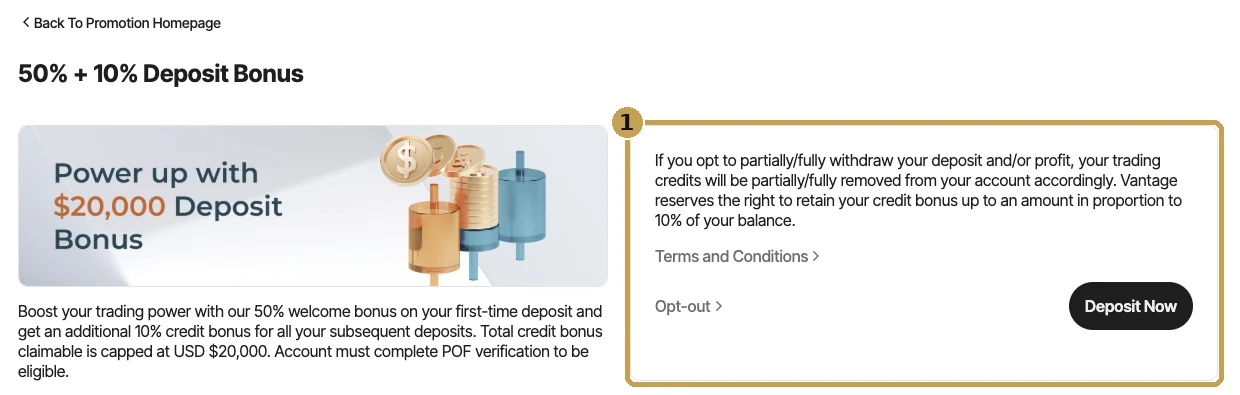
Vantage’s offer for new clients, from vantagemarkets.com
On the bonus page, tap Opt-in. Once you’re in, the button changes to Opt-out, as shown here.
New clients get 150% on their first deposit (up to $1,500 of bonus), then 25% on later deposits. The offer depends on your country, and Vantage can change it. Existing Vantage clients see a smaller offer, like the 50% + 10% shown here.
Step 14
Accept the bonus terms
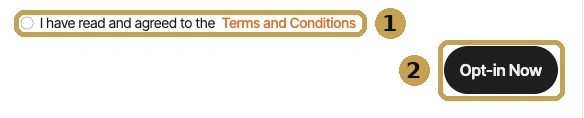
Tick I have read and agreed to the Terms and Conditions.
Tap Opt-in Now.
Once you’re opted in, tap Deposit Now on the same page. It takes you straight to the deposit screen.
The bonus is trading credit: it can’t be withdrawn, and withdrawing money removes a matching share of it. Your profits are yours to withdraw.
Step 15
Deposit
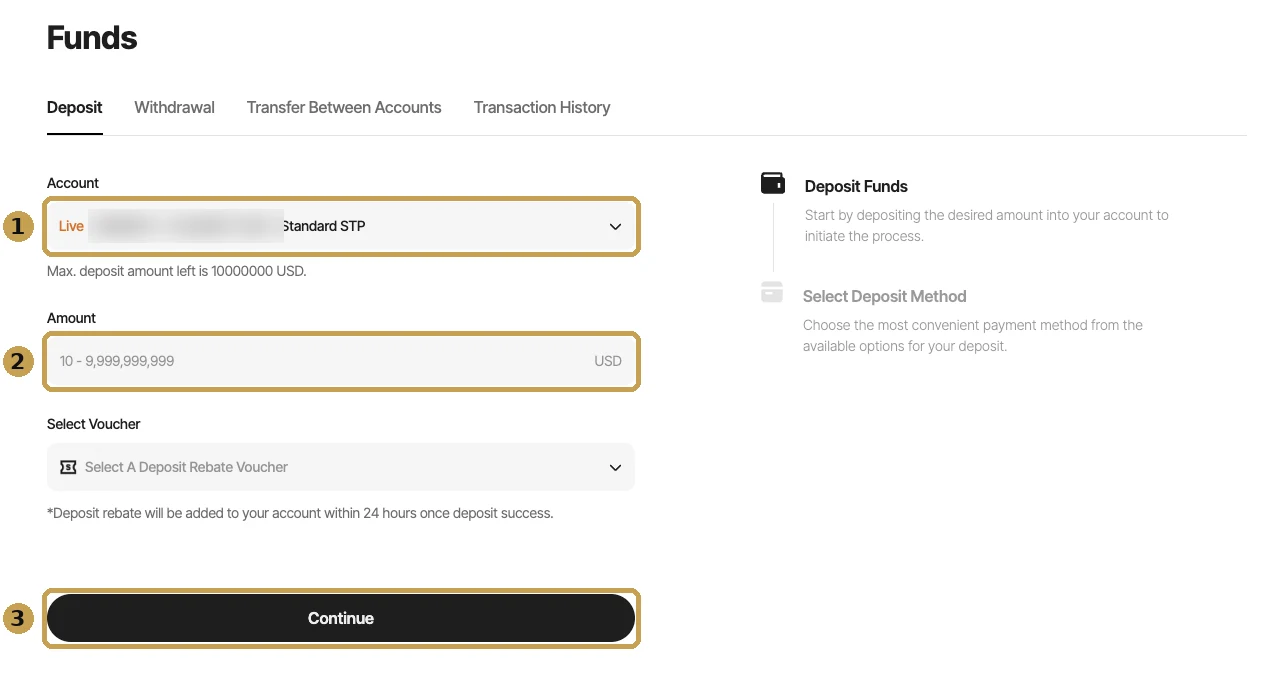
On the deposit screen, choose your new Live Standard STP account. (You can also get there from Funds → Deposit.)
Enter the amount: minimum $1,000, ideally around $2,000 (or the same in your currency).
Tap Continue.
Only deposit what you can afford to put at risk.
Step 16
Pay by card (recommended)
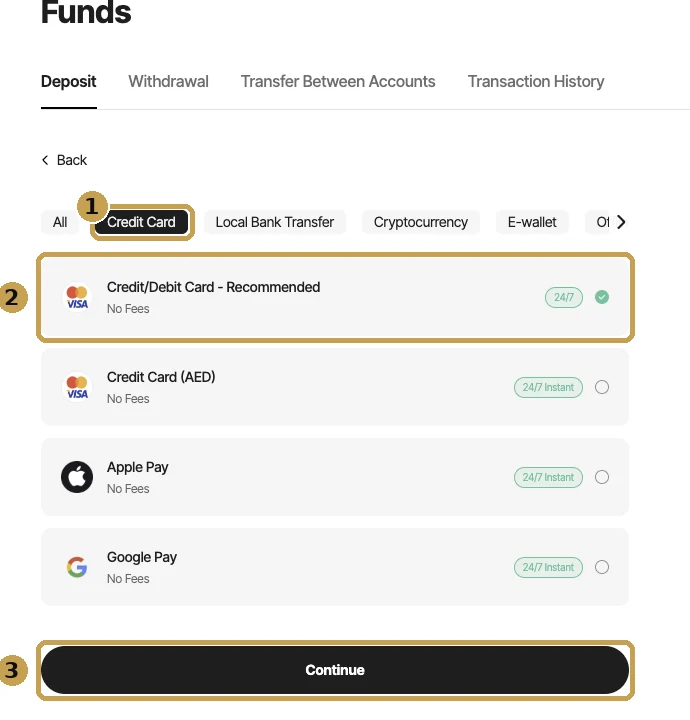
Tap the Credit Card tab.
Choose Credit/Debit Card – Recommended (Apple Pay and Google Pay also work).
Tap Continue and follow your bank’s steps.
Use a card in your own name. Vantage pays withdrawals back through the same method you deposited with. No card? A bank transfer also works and keeps the bonus. E-wallet and crypto deposits may lose it.
Step 17
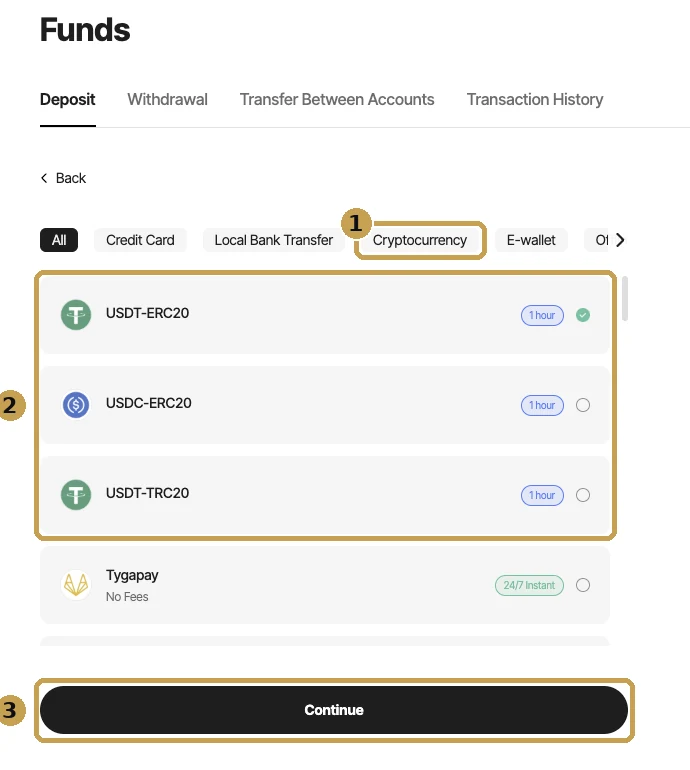
Or pay by crypto: take care
Tap Cryptocurrency.
Choose the coin and the network your wallet will send on. USDT-ERC20 and USDT-TRC20 are different networks; they must match.
Tap Continue. Copy and paste Vantage’s deposit address (never type it), check the first and last few characters, and send the exact amount.
Crypto sent to the wrong address or network can’t be recovered. Allow for your wallet’s network fee so the full amount arrives. The bonus may not apply to crypto deposits, so card is safer.
You’re ready
Last step · Message us
Message Justin on WhatsApp at
+44 7590 422083
once your deposit has landed. We’ll connect Goldsmith and confirm when you’re live.
Quick checklist
Signed up through our link (Rebate Account showed 24007801).
Lv1, Lv2 and Lv3 verified, plus Face Verification under Plus.
Live Standard STP account, MT4 or MT5.
Opted in to the deposit bonus before depositing.
Deposited at least $1,000, ideally around $2,000.
Good to know
Goldsmith is free: no subscription, no performance fee, no share of your profits. You pay
only Vantage’s normal trading costs. The money stays in your own account, in your name,
and you can stop whenever you like. You can watch every trade in your MT4 or MT5 app.
Trading gold on leverage is high risk and you can lose some or all of your deposit. Expect
losing weeks as well as good ones. Smith Block Markets is a Vantage introducing broker and is
paid a rebate by Vantage at no extra cost to you. Screens are Vantage’s own and may change.